Set the product range
Specify the 10-inch IPS screen and rotary knob for the proposed residential smart-home panel range.

10-inch IPS panel with Tuya control, built-in Zigbee, two relay channels and in-wall installation. Review the device list, target market and configuration before quoting.
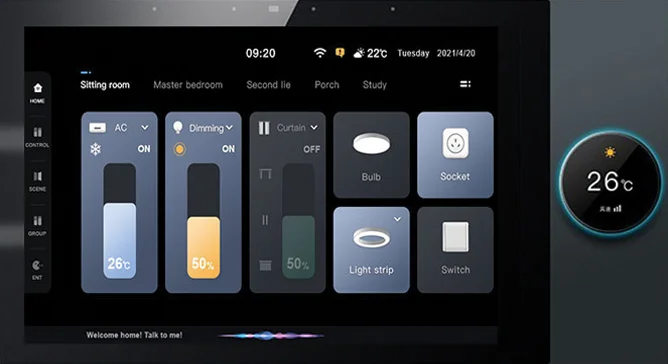
TD-F10 combines the Tuya interface, compatible Zigbee devices, local switching and network connections in one wall-mounted control point for residential projects.
Specify the 10-inch IPS screen and rotary knob for the proposed residential smart-home panel range.
Use the Tuya system on TD-F10 to pair supported Zigbee sub-devices. Check each model, firmware version and required function before a dealer quotation.
Assign the two relay channels to defined lighting loads. Use RS485 for external devices where the installer scope requires it.
For supported configurations, review Tuya app workflows, documentation, training and after-sales ownership with the channel partner.
Tuya system support for Zigbee devices depends on the device profile, firmware and required function. Include the target country, buyer segment, device list, room count, relay loads and expected order range so the product and support scope can be reviewed together.
Use the following functions to define a TD-F10 range for villa, apartment and residential renovation projects.
Connect supported Zigbee models through the Tuya system. Check the device profile, firmware and required functions before deployment.
Assign lighting, curtains, air-conditioning and room modes to a wall-mounted control surface.
Use two relay channels for defined lighting loads. The published limit is less than 200 W per channel.
For supported configurations, use the Tuya app for remote control and approved device administration. App functions vary by project configuration.
Supports local music, Bluetooth, TF card, U disk and AUX playback. External speaker power depends on the selected version.
Use a standard single 86 or double 86 bottom box. Check the selected Version 1 or Version 2 interface before installation.
The table lists the confirmed TD-F10 baseline. Version-dependent interfaces and unresolved external speaker power are identified separately.
| Model | TD-F10 |
| Display | 10-inch IPS capacitive multi-touch |
| Resolution | 800 × 1200 |
| Operating system | Android 11 |
| CPU | Quad-core Cortex, 1.8 GHz |
| Memory | 2 GB RAM / 8 GB ROM |
| Rotary knob | 1.28-inch colour display knob |
| Ethernet | 10/100M adaptive Ethernet |
| Wi-Fi | 802.11 b/g/n, 2.4 GHz, up to 150 Mbps |
| Zigbee | 802.15.4 PHY/MAC protocol stack |
| Bluetooth | Bidirectional Bluetooth connection |
| RS485 | Half-duplex, 3.5 mm interface terminal |
| PoE | Not supported |
| Zigbee device capacity | Stated support for 50+ compatible sub-devices, subject to firmware, device profile and project conditions |
| Relay output | 2 × 200 W |
| Built-in speaker | 2 W |
| Output impedance | 4–8 Ω |
| Frequency range | 20 Hz–20 kHz |
| THD / SNR | 0.03% (1 W, 1 kHz) / 98 dB |
| Product dimensions | 297 × 162 × 11.5 mm |
| Installation | Standard single 86 / double 86 bottom box |
| Main host input | AC 100–240 V, 50/60 Hz |
| Version 2 amplifier supply | AC 90–250 V; separate from host input |
| Operating temperature | 0–40°C |
| Operating humidity | 5%–90% RH, non-condensing |
Answers cover channel fit, confirmed host specifications and items that require model-level validation.
TD-F10 can be included in a residential smart-home panel range for distributors, dealers and installers. Suitability depends on the target market, buyer segment, compatible device portfolio and expected order range; review these points before commercial terms.
For a quotation, provide the target country, customer segment, proposed Zigbee device list, room count, relay loads, installation box, network and power requirements, selected version and expected order range. This information is used to verify compatibility, documents and supply scope.
Private-label or OEM supply is subject to the requested hardware, software, packaging, order volume and approval route. Specify the customization brief, firmware route, branding, MOQ and lead time before treating the option as available.
No. TD-F10 is a Tuya smart home control panel with built-in Zigbee connectivity for compatible devices. Specify and deploy it as a TD-F10 control panel, not as a separate universal Zigbee gateway.
The specification lists support for 50+ Zigbee sub-devices. Actual capacity depends on device profile, firmware, radio environment and project topology; validate the proposed device list before deployment.
No. The Tuya system on TD-F10 supports selected device profiles. Check the model, firmware and required function before quoting.
TD-F10 has two relay output channels. The published limit is less than 200 W per channel; check the total load against the electrical design.
No. TD-F10 does not support PoE power according to the hardware manual. Use the specified AC input and approved network connection during installation.
Installation uses a standard single 86 or double 86 bottom box. The main host input is AC 100–240 V, 50/60 Hz; the Version 2 amplifier supply is separate. Check the hardware version before installation or quoting.
TD-F10 has a built-in 2 W speaker. External speaker power is version-dependent. Check the selected hardware against the 10–25 W and less-than-30 W references before quoting.
Check the panel power, temperature, network state and the affected control function before replacing the screen. Record whether the entire interface is frozen or only a connected function is unavailable. Verify that the installation location has adequate ventilation and that the panel is not under continuous heat load. Preserve configuration details before a restart or reset. Open the touch-response checklist →
Do not install a wall control panel in a sealed, poorly ventilated or heat-trapping cavity without reviewing the thermal conditions. Heat can shorten component life and create intermittent faults that are difficult to reproduce. Check the mounting space, nearby heat sources, ventilation path and model-specific operating limits before installation. Leave service access for future inspection. Review the installation environment guidance →
Check the Ethernet cable, switch port, IP assignment, network path and service connection before treating the panel as failed. Test the cable and port with a known working device, then determine whether the issue is local to one panel or affects the wider project. Record the network change history before resetting configuration or replacing equipment. Open the offline troubleshooting checklist →
Check for stable power and inspect the display, cable connection and video source path before replacing the panel. Distinguish a screen fault from a network, camera or source-device fault by testing the affected input independently. Check for heat, loose connectors and intermittent power loss. Preserve the configuration and fault record so the replacement decision can be verified. Open the display troubleshooting checklist →
Send the target country, buyer segment, intended Zigbee device list, room count, relay loads, installation box, expected order range and support requirements. Use this brief to review the product and configuration scope before quotation. Read the smart-home panel sourcing FAQ for the device and installation checklist.