Smart home panel manufacturer · supplier · OEM
Smart Home Panels for Connected Residential Projects.
Trudian supplies model-specific Tuya and Zigbee control-panel options for distributors, dealers, installers and OEM teams. Define the device list, installation conditions and handover scope before adding a panel to a commercial range.
Featured model
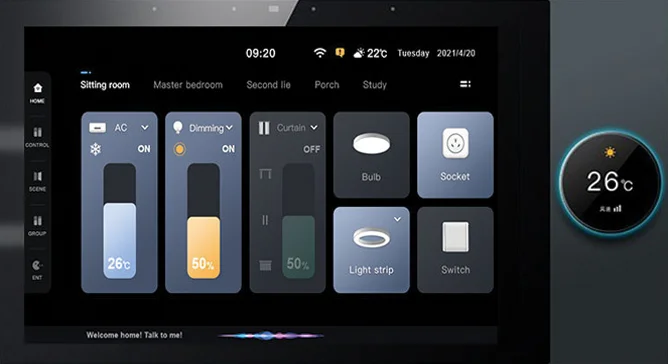
TD-F10 Tuya Zigbee Smart Home Control Panel
Use the model page for the complete technical record. The values below are a starting point for scoping, not a blanket compatibility or certification claim.
Channel fit
For distributors and dealers
Build a residential panel range around a named device portfolio and a clear installation and support owner.
- Target country and buyer segment
- Expected order range and sample plan
- Training, documents and handover scope
Review distributor route →Integration boundary
Tuya + selected Zigbee devices
Compatibility is confirmed by device model, profile, firmware and required function rather than by the protocol name alone.
- List the devices and scenes to control
- Confirm network and account ownership
- Test a representative room before scaling
Read sourcing FAQ →OEM pathway
Private label or custom scope
Branding, packaging, firmware, app route and documentation can be reviewed against the project brief and order range.
- Standard supply from 200 units
- OEM/private label from 500 units
- ODM development from 1,000 units
Review OEM/ODM options →Display10-inch IPS · 800×1200
Device pathTuya · built-in Zigbee
Local relay2 channels · 2×200 W published limit
PowerAC 100–240 V · no PoE
Evidence boundary: Confirm model, hardware revision, firmware, device list, electrical load, installation box and destination documentation in the written quotation before deployment.
Buyer questions
What should a smart home panel supplier confirm?
These answers help a procurement team prepare a usable RFQ instead of assuming that every Tuya or Zigbee device will work.
Is TD-F10 compatible with every Tuya or Zigbee device?
No. Confirm the exact device profile, firmware, pairing route and required function before quoting. A shared protocol label does not establish compatibility.
How many Zigbee devices can TD-F10 connect?
The specification lists support for 50+ compatible Zigbee sub-devices. Actual capacity depends on device profile, firmware, radio environment and project topology; validate the proposed device list before deployment.
What should a distributor include in a quotation brief?
Share the target country, customer segment, proposed device list, room count, relay loads, installation box, network and power requirements, selected version and expected order range.
Does TD-F10 support PoE?
No. Use the specified AC input and approved network connection. Confirm the hardware version, wiring route and power protection in the project brief.
Build the panel range around a tested project scope.
Send the market, device list, installation conditions and expected order range. We will identify the relevant model evidence and documentation route.
Start a smart home panel inquiry
Smart home panel supply brief: panel, gateway and device portfolio
A smart-home panel supply is comparable when the panel, gateway, device list, power route and account owner are named. Compare a tested project scope instead of a protocol badge.
Checks before shortlisting
- TD-F10, Tuya and Zigbee are tied to a device list and account region.
- The AC 100–240 V supply and relay loads are kept as separate installation fields; the panel has no PoE input.
- Wireless coverage and gateway placement are tested at the hardest representative location.
- The device-list pilot, stocking order and OEM order are separate scenarios.
- Pairing, event, permission, recovery and handover have observable pass conditions.
- CE, FCC, UKCA and RED files name the model, revision and destination.
- Installer, distributor, account owner and RMA roles are written before supply.
Implementation and handover
- Select the panel, gateway and device list for one representative room or entrance.
- Record power, Wi-Fi, network, wall and mounting conditions before pairing.
- Test device pairing, event, permission, recovery and account invitation.
- Capture firmware, device names, document revision and support route.
- Release the next quantity only after the pilot exception list is closed.
Risks to resolve before supply
- A Zigbee label does not prove every device or gateway combination.
- A single-room test cannot prove coverage across every wall condition.
- Unrecorded account ownership makes resident onboarding and support ambiguous.
- A supply value without a recovery test can leave the installer with hidden work.
Before requesting a quote
Choose the panel route when model, device list, site measurement, account owner and acceptance record agree. Keep the exact SKU in the RFQ. Share the selected model, configuration and destination market through the project RFQ route.